
Extension / Add-on
Anki Leech Detector: Advanced Card Analysis
This Anki add-on offers new ways to understand and identify 'leeches' based on advanced criteria beyond simple lapse count. It integrates into card info, browser searches, stats, and provides a summary window.
- Extension / Add-on
- #Anki
- #Leech
Shared by 天 Staff
Published ·Updated
Details
Introduction
This add-on aims to offer new ways to understand how your card might not be leeches, based on more criteria than simply looking at lapses count.
To understand better the algorithm, check my blog about this algorithm.
Features
Card Info View
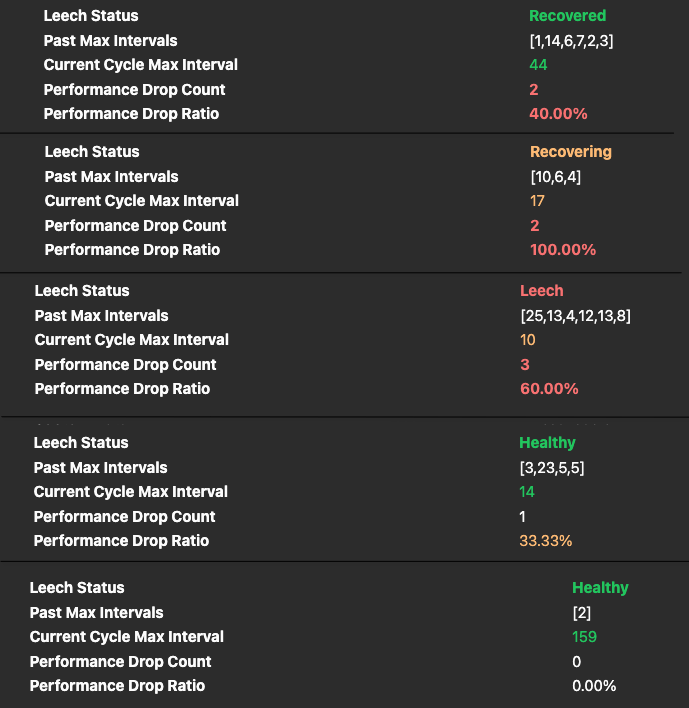
Added new field to see the Leech status of a card and the key metrics allowing to determine if it's a leech or not.
Browse View
You can add to your queries new options to filter leeches:
* leeches:all
* leeches:active
* leeches:recovering
* leeches:recovered
* leeches:healthy
Those flags combine as "OR", meaning the result will be all results merged.
You can also specify custom leech detection thresholds, those are valid searches:
* leeches:active[drop_count=5,drop_ratio=.5]
* leeches:active[drop_count=5]
* leeches:active[drop_ratio=.5]
* leeches:recovered[drop_count=1,drop_ratio=.5] leeches:active[drop_count=5,drop_ratio=.5]
Note:
* All custom filters are under the hood replaced by *, and then only the search is filtered. So, (A leeches:active) OR (B leeches:recovered) will be equal to (A *) OR (B *) AND (leeches:active OR leeches:recovered). If you want proper evaluation of such queries, you should populate a card field with the leech status and filter on it like you would do with any normal card fields.
* If you specify more than once the same type of leeches filter, the last one will have priority. Example leeches:active[drop_count=1] leeches:active[drop_count=2] the drop_count=2 will replace the drop_count=1.
Stats / Plugins Search
leeches:* filters are also supported in Stats screens and plugins doing card searches (for example Search Stats Extended).
This compatibility patch is enabled by default.
You can disable it in the add-on config in Anki with "enable_stats_graphs_patch": false.
Restart after this change.
Tools Summary Window
From Tools, you can open Leech Detector Summary to quickly see:
* Total leeches
* Active / Recovering / Recovered counts
* Per-deck split
* Double-click any deck table cell to open Browser directly on the corresponding search