
Program
Chibipop: Lightweight Windows OCR Popup Dictionary
A lightweight popup dictionary for Windows that lets you hover over Japanese text anywhere on your screen for instant lookups, inspired by the wei method.
- Program
- #OCR
- #dictionary
- #mining
Shared by 天 Staff
Published ·Updated
Details
What is Chibipop?
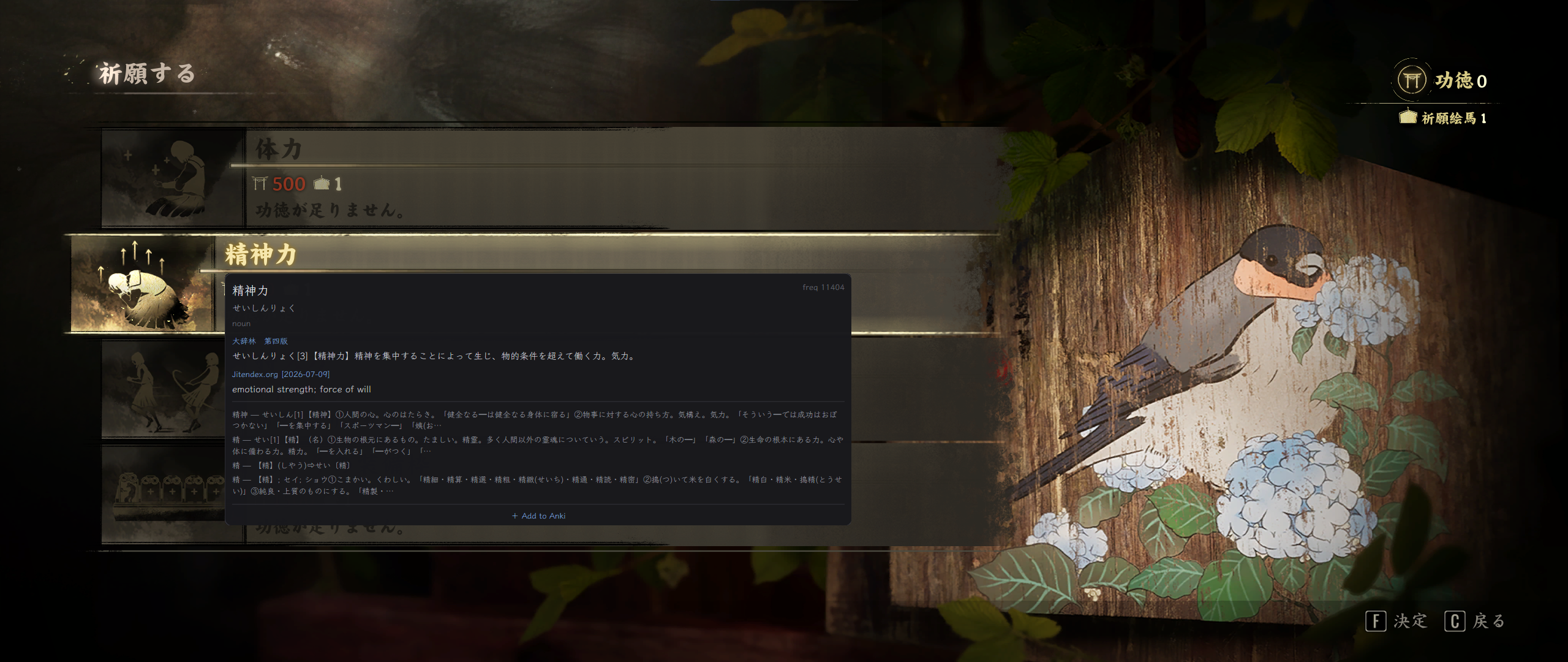
chibipop is a lightweight popup dictionary designed for Windows, inspired by the creator of the wei method and weikipop. It allows you to hover Japanese text anywhere on your screen to perform instant dictionary lookups.
Features
- Instant Hover Lookups: Hover over Japanese text anywhere on screen to get popup definitions.
- Brings Your Own Dictionaries: Supports Yomitan-format dictionary archives (such as Jitendex or monolingual dictionaries like 大辞林).
- Frequency List Support: Ranks words across all dictionaries using frequency data.
- OCR Plugin System: Uses Windows OCR by default, but supports alternative engines like meikiocr (a game-trained Japanese OCR engine) via a plugin architecture.
- Customizable Capture Area: Adjust capture width, height, scan alphanumeric text settings, and per-character lookup modes.
- Per-Language Dictionaries: Assign specific dictionary orders to different OCR languages.
Quick Start
1. Download the latest release ZIP for Windows.
2. Run chibipop.exe (the settings window will open on first launch).
3. Add your dictionary archives and press Apply.
4. Hover over Japanese text anywhere on your screen.