
Program
Countdown Master - Daily Immersion Timer
A desktop timer for daily goal tracking, combining a countdown, goal tracking, heatmaps, and daily logs. Good for monitoring your immersion progress and staying motivated.
- Program
- #Time Management
Shared by 天 Staff
Published ·Updated
Details
Countdown Master
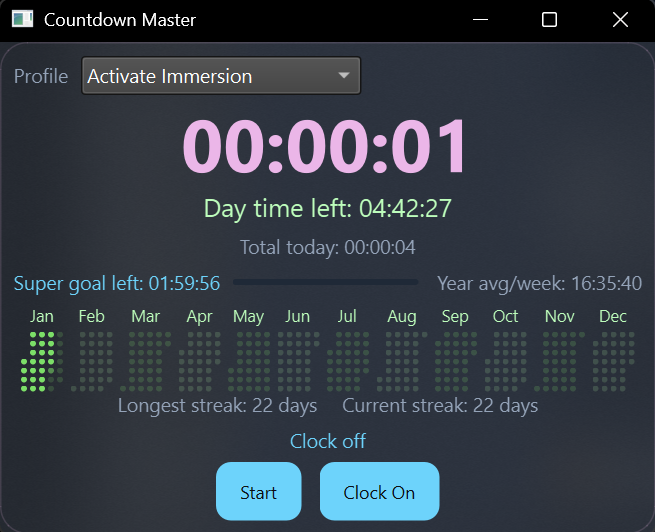
Countdown Master is a small desktop timer that combines a countdown goal timer with daily goal tracking, a year heatmap, and daily logs. It's designed for tracking daily immersion and offers various features to help users stay on track and visualize their progress. The application is built with PySide6 (Qt) and stores data locally in data.csv, with user preferences in settings.ini.
Features
* Cross-Platform Gamepad Support: Supports Linux and macOS for gamepad integration using pygame (requires re-running requirements if upgrading from an older version).
* Reordered Right-Click Menu: Improved organization of the right-click context menu.
* Calendar View: A new view that displays time blocks for better visualization.
* Profile Editor: Customize colors, which are reflected in the trends graph.
* Hotkey Settings: Right-click option to toggle buttons on/off using keyboard or gamepad (XInput on Windows, SDL via pygame on macOS/Linux).
* Clock On/Off: Simply click to start tracking time without needing a specific goal, adding to daily tracking.
* Hide Menu UI: Option to remove unnecessary UI elements to make the window smaller.
* Enhanced Log: Now shows a full week of tracking for the selected date.
* Profiles: Includes pre-defined profiles, with the option to add your own.
* Countdown timer with a “current goal” duration.
* Daily super goal tracking and a goal-left indicator.
* Year heatmap of logged time, with adjustable cell size and month padding.
* Daily log viewer with percent-of-goal summaries.
* Customizable colors, fonts, and glow pulse duration.
* Always-on-top mode and saved window position/size.
Setup
Requirements
* Python 3.9+ (PySide6 supports 3.8+).
* Windows, macOS, or Linux with a desktop environment.
Dependencies are listed in requirements.txt (including pygame for cross-platform gamepad support).
Installation and Running
To install, clone the repository and set up a Python virtual environment:
1. Create a virtual environment: python -m venv .venv
2. Activate the virtual environment:
* Windows (PowerShell): .venv\Scripts\Activate.ps1
* macOS/Linux (bash/zsh): source .venv/bin/activate
3. Install dependencies: pip install -r requirements.txt
Before running on certain Linux distributions, you may need additional libraries. For example, on Ubuntu:
sudo apt update
sudo apt install -y libxcb-cursor0
To run the application, execute: python main.py
On Windows, you can also use run.bat if Python is in your path.
Usage
* Right-click the window to open the menu.
* Use “Set Current Goal” to set the countdown duration.
* Use “Set Daily Super Goal” to define your daily target.
* The heatmap displays total time logged per day; scroll over it to change the base cell size.
* Settings allow you to customize colors, fonts, glow duration, and heatmap layout.
Data Files
* active.csv: Stores active profile, session history, and daily totals.
* settings.ini: Stores UI preferences, goals, and window geometry.