
Program
Tokei - Immersion Dashboard
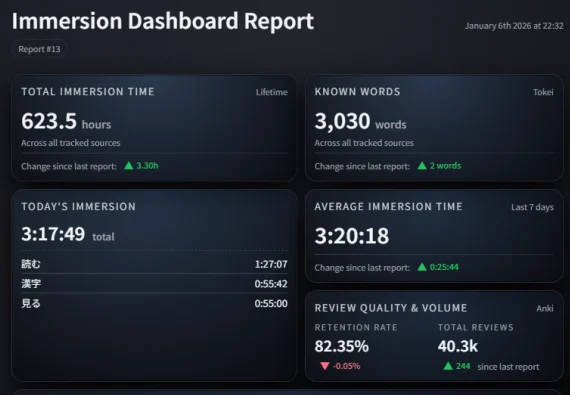
Tokei is a Windows desktop app that centralizes your language learning stats from tools like Toggl, Anki, Mokuro, Ttsu Reader, and GSM. It creates a clean, at-a-glance HTML/PNG immersion dashboard, helping you track time, retention, and character counts without modifying your existing data.
- Program
- #Immersion Tracking
Shared by 天 Staff
Published ·Updated
Details
Tokei is a Windows desktop app that syncs stats from the tools you already use and turns them into a clean, at-a-glance immersion dashboard (HTML + PNG).
It’s read-only by design — nothing in Anki, GSM, or other apps is modified. If something isn’t set up yet, Tokei shows a clear warning instead of failing.
What Tokei Tracks:
* Toggl — lifetime + today immersion time (with description breakdowns)
* Anki — retention and review totals (built-in snapshot, no add-ons required)
* Reading
* Mokuro — manga character counts
* Ttsu Reader — novel character counts
* GameSentenceMiner (GSM) — total characters + optional live session tracking (via plugin)
* Optional: known.csv — can import a known words list to update your known words statistic
What You Get:
* An HTML dashboard
* Optional PNG export for sharing
* A warnings file only if something needs attention
Daily Usage:
* Sync → refresh your data (safe to run anytime)
* Report → generate the dashboard
* One-click option to sync before reporting
#Important Toggl Note:
Toggl's Personal API limits are 30/hr. Because of Toggl’s API/history limits, Tokei can only pull a recent window of time (60 days by default). If you’ve been using Toggl longer than that, you’ll want to set a one-time lifetime baseline so your total hours stay accurate.
How to set your Toggl baseline:
1. Go to Toggl Track → Reports → Summary
2. Set Start = your first immersion day
3. Set End = yesterday (don’t include today)
4. Select your immersion project(s)
5. Copy the Total time and enter it in Tokei as HH:MM:SS
Status:
Tokei is pre-1.0 — stable for daily use, with ongoing UI polish and documentation.